Tip: This tutorial assumes the user has at least a basic understanding of Python programming.
Although EasyMorph has an extensive set of data preparation and automation actions, there may be times when you wish to do something not natively supported. One such example would be to apply a machine learning or statistical analysis algorithm as part of the data processing. To make this possible, EasyMorph offers a comprehensive, low-level integration with Python scripting.
The EasyMorph Python integration consists of two main components; the Call Python action and an "easymorph" Python module.
Note: The EasyMorph Python integration requires that Python version 3.11 or later be installed on the same machine as EasyMorph desktop and/or EasyMorph Hub.
The Call Python action
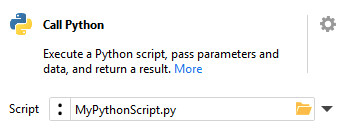
The Call Python action can be placed anywhere in an EasyMorph workflow. The "Script" option within the action's configuration must be populated with the path to the Python script file you wish to call. It can be specified as either text, a parameter or the first value in a specified column.
The EasyMorph Python module
The EasyMorph Python module provides additional low-level functionality, such as:
Receiving and returning datasets from EasyMorph within Python
Creating and updating EasyMorph datasets
Accessing the EasyMorph project parameters from within Python
Identifying EasyMorph project cancellation
Providing status updates to EasyMorph
The module can be used when writing Python scripts outside of EasyMorph by first installing it. The module is located in the EasyMorph installation directory, usually %appdata%\Local\EasyMorph\. Run the following command from the EasyMorph installation folder to install the Python module:
Note that the above example also provides a when_standalone value of "1", which will be returned as the default when the Python script is run outside of a calling EasyMorph workflow and so no parameter values are available.
All parameters of the EasyMorph project can also be returned as a Python dictionary using the get_params_as_dict() method:
params = em.get_params_as_dict()
Detecting "standalone" mode
The EasyMorph Python module provides a method to check whether the Python script is being executed by the Call Python action in an EasyMorph workflow (known as "workflow mode") or if it has been executed by some other means (known as "standalone mode"):
 if em.standalone:
        print("Running in standalone mode")
    else:
        print("Running from an EasyMorph workflow")
This capability can be useful when developing and testing your Python scripts outside of EasyMorph, or to make your Python script function in both scenarios.
More information and examples
More information and examples can be found on the Using Python in EasyMorph help page. Alternatively, the below webinar replay looks at practical examples of combining EasyMorph with Pythons:
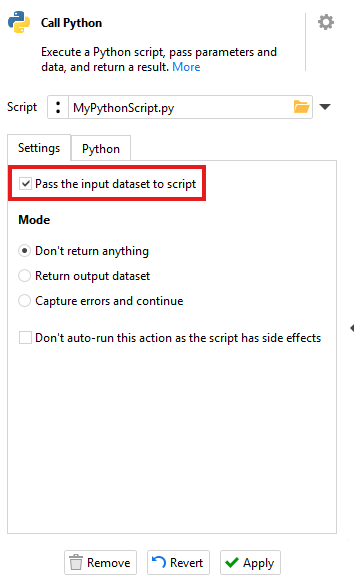
It is possible to pass the dataset received by the Call Python action to the Python script. To do so, the option "Pass the input dataset to the script" must be checked within the Call Python action's settings.
The passed dataset can then be read within the Python script using the input method provided by the EasyMorph Python module:
ds = em.input
Converting to and from Pandas DataFrames
Pandas is a popular open-source Python library used for data analysis and manipulation. It is supported by the majority of data analysis and data science Python libraries. The EasyMorph Python module provides two functions to convert between EasyMorph datasets and Pandas DataFrames.
The to_dataframe() method converts an EasyMorph dataset to a Pandas DataFrame:
df = ds.to_dataframe()
The from_dataframe() method converts a Pandas DataFrame to an EasyMorph dataset:
ds = em.Dataset.from_dataframe(df)
Returning a dataset to EasyMorph
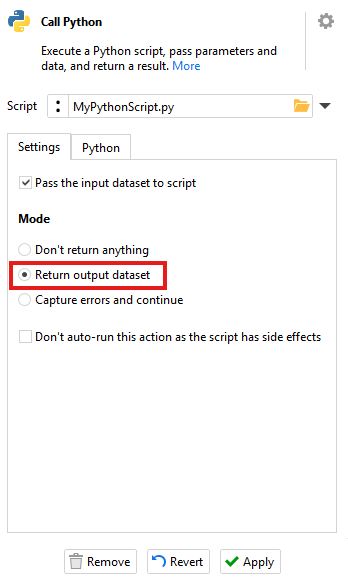
An EasyMorph dataset can also be passed back to the calling EasyMorph project. To do so, the "Return output dataset" mode must be selected within the Call Python action settings.
The dataset can then be output from your Python script using the yield_output() method:
em.yield_output(ds)
Monitoring workflow cancellations
For long running Python scripts, it preferable for the EasyMorph user to be able to cancel the execution of the workflow and for it to subsequently cancel the execution of the Python script. To make this possible, the EasyMorph Python module provides the is_cancellation_requested() method which can be checked from within your Python script:
 if em.is_cancellation_requested():
        raise RuntimeError("Cancelled")
Note that in standalone mode, is_cancellation_requested() always returns False.
Script Status
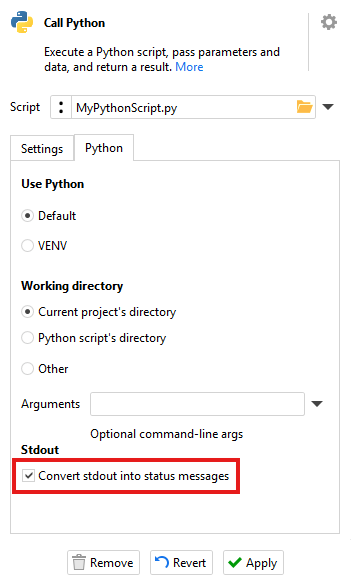
The Call Python action has the ability to report stdout messages (i.e. "print") found within the Python script as if they are EasyMorph workflow status updates. This can be especially helpful for monitoring the progress of longer running Python scripts. To enable this ability, the "Convert stdout into status messages" option in the Call Python action's settings must be selected:
Generating EasyMorph warnings
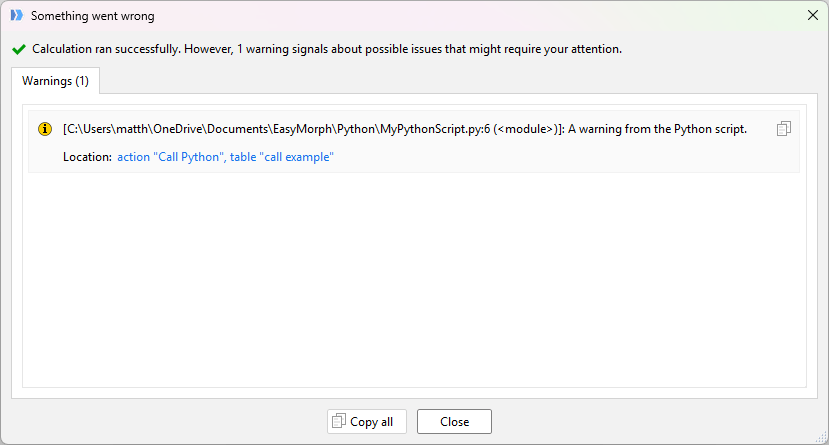
EasyMorph warnings can be generated from the Python script using the warn() method of the EasyMorph Python module:
em.warn("A warning from the Python script.")
These warnings are reported inside EasyMorph in the same way as warnings generated by any other EasyMorph workflow action:
Example Python script
The below example demonstrates how to perform a K-means clustering analysis in Python using many of the features and techniques mentioned above:
Note: Note that this example uses additional 3rd-party open-source libraries (Pandas, NumPy and Sikit-learn) which will need to be installed for this example script to work.
    from datetime import date, datetime
    import pandas as pd
    import numpy as np
    from sklearn.preprocessing import StandardScaler
    from sklearn.cluster import KMeans

    import easymorph as em

    print("Beginning KMeans analysis")

    # If we're running in standalone mode then we need to handle loading the data from the file directly
    if em.standalone:
        print("NOTE: Running in standalone mode")
        print("Getting the data from CSV as standalone")
        df = pd.read_csv("data/marketing_campaign.csv", sep="\t")
    else:
        print("NOTE: Running from EasyMorph workflow")
        print("Getting the dataset passed by the EasyMorph workflow and turning it into a Pandas DataFrame")

        # Load in the data passed from EasyMorph and convert it to a Pandas DataFrame
        df = em.input.to_dataframe()

    print("Getting the desired number of cohorts from the workflow parameter")
    segments = int(em.get_param("Segments", when_standalone="3"))

    print("Performing cohort analysis")
    # Assign the features we want to work with to a variable
    data = df[["Age", "Income", "TotalAmountSpent"]]

    # To do a KMeans analysis, we need the ensure the values are normally distributed.
    # Transform the features and save the result to a variable
    df_log = np.log(data)

    # To do a KMeans analysis, we also need the features to be the same scale.
    std_scaler = StandardScaler()
    df_scaled = std_scaler.fit_transform(df_log)

    # Build the KMeans model
    model = KMeans(n_clusters = segments, random_state=42) # These are good targets for parameters
    model.fit(df_scaled)

    # Assign the cluster from the model back to the data
    df = df.assign(Cluster = model.labels_)

    # if standalone save output to CSV else pass back to EasyMorph
    if em.standalone:
        print("Outputting the results to a CSV file")
        # Output as a CSV instead
        df.to_csv('segmented_data.csv', index=False)
    else:
        print("Returning the results to the EasyMorph Workflow")

        # Convert the dataframe back to an EasyMorph dataset and pass it back to EasyMorph
        em.yield_output(em.Dataset.from_dataframe(df))