Over the last few years, the adoption of cloud based Business Intelligence (BI) platforms has risen rapidly, driven by benefits such as scalability, “pay-as-you-go” cost models and remote accessibility. All major players – including Microsoft, Tableau and Qlik – now offer cloud versions of their flagship BI tools. In fact, many have all but abandoned their on-premise versions with few updates and new features being released.
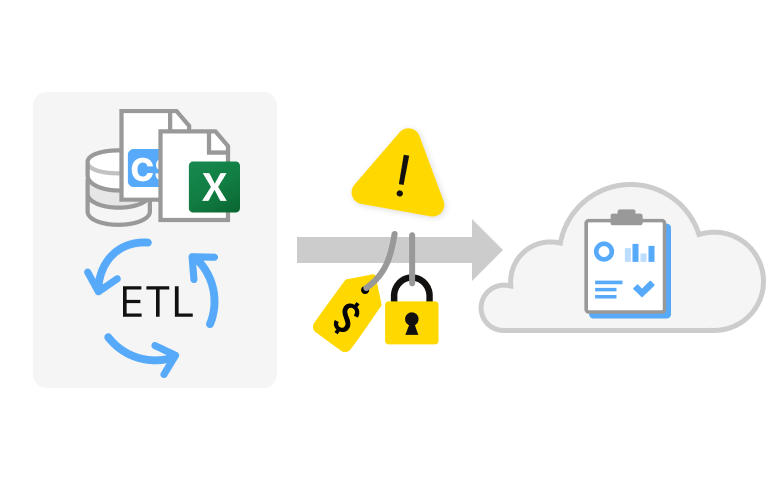
There are however many challenges to adopting such cloud BI platforms. Amongst the most important is how you get your business data from where it is located into the BI vendor’s cloud platform. This isn’t just a technical problem, but comes with financial and security challenges also.
Considerations for getting your data to a BI cloud
Business data is typically strewn across many locations, such as:
- On-premise databases, business software tools and systems
- Cloud based SaaS platforms
- Cloud hosted databases
- SaaS, cloud hosted or on-premise file storage
This presents us with the problem of gathering all of this data together; extracting it from the relevant locations, transforming it to maximize value for reporting and dashboarding, and then transferring it to our chosen cloud BI platform. A process known as ETL.
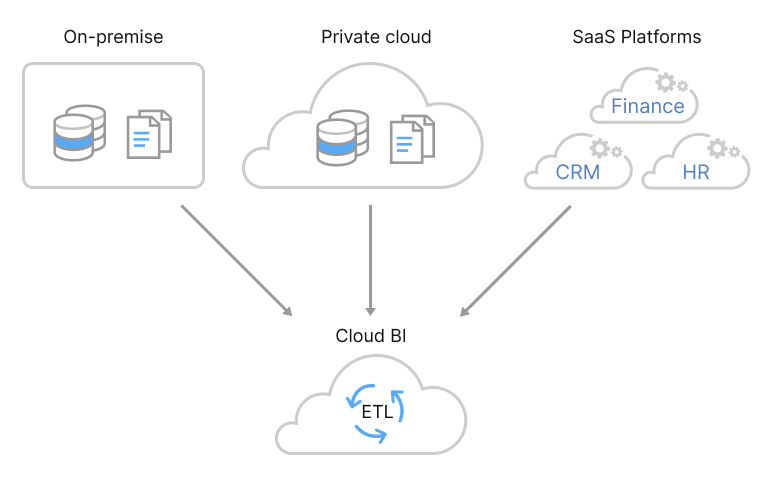
A common misconception amongst less technical business users is caused by the term “the cloud”. Our business data is already in “the cloud” and so if our BI tool is also in “the cloud” we don’t need to move it. Obviously this isn’t true and we have the same problems moving data from a SaaS platform or private business cloud to a cloud BI platform as we do moving data from on-promise.
All BI vendors offer a plethora of tools and features to allow you to get your data into their cloud platforms. And thus, you might assume that the problem has been solved and there is nothing for you to worry about. There are however several important points to consider still.
Consideration 1 - Security
Most BI vendors offer software that you install wherever your data is located. This software serves as a bridge or gateway between your data and the vendor’s cloud BI platform. The cloud BI platform then uses this gateway to “pull” the data in. Importantly, any transformation or aggregation then happens in the BI cloud.
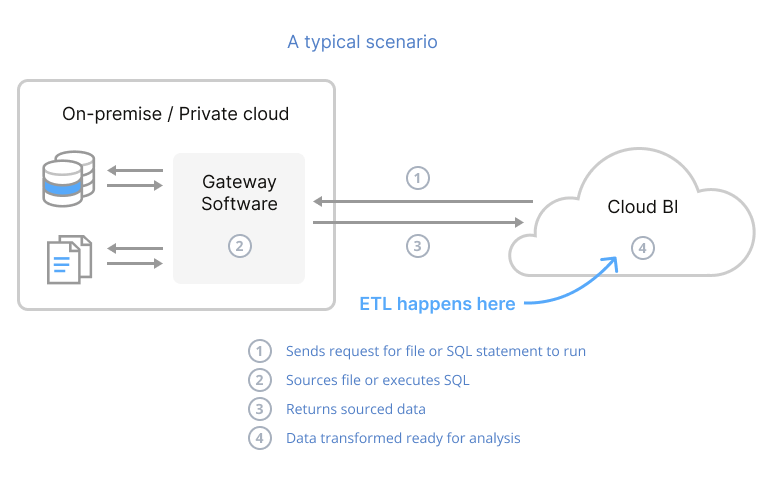
Pulling data in this way means giving the cloud BI platform full control of what data to import and how often it should be refreshed. Many IT Directors, CIO’s and network architects see this as opening up a potential backdoor to their IT networks.
You may argue the risk is low, but as we’ve seen many times in recent years, 3rd party tools can become the target of sophisticated cyber attacks. One such attack hit SolarWinds. Their platform was compromised by a malicious actor and an estimated 18,000 of their customers became infected. The malware laid undetected for months and spread to their customers’ customers. Responding to the problem is said to have cost each company USD $12million.
If we perform ETL in the cloud BI platform, the process begins by pulling our granular business data in via the vendor’s gateway software. Should the cloud BI platform be compromised by malicious actors, they have full access to our detailed data.
This is where EasyMorph excels. If we install EasyMorph where our data sits - on-premise or in our own cloud - we can use EasyMorph to extract and transform data inside of our secure network and push the result (often aggregated) to the BI cloud when complete. Doing it this way means should the cloud BI platform be compromised, the most they gain access to is the aggregated data - likely a much less concerning scenario. EasyMorph can even refresh the dashboards and reports in most BI platforms (natively or via an API call).
It’s also worth noting that if we use the BI vendor’s gateway, we must strictly control what access it has to run queries against our datasources. If a mistake is made, it may be possible for a malicious actor or even an authorized user of our BI tool to run a query against a database we never intended. Pushing just the data we wish gives us one less thing to worry about.
NOTE EasyMorph works perfectly well when “air-gapped”, meaning we can even block all internet access for the server EasyMorph sits on, except to our BI cloud. This again helps to ensure that compromising EasyMorph is highly unlikely.
If you’d prefer to keep orchestration of data refreshes in the BI platform, EasyMorph can support this also - accepting simple webhooks to trigger the relevant ETL processes via EasyMorph Gateway.
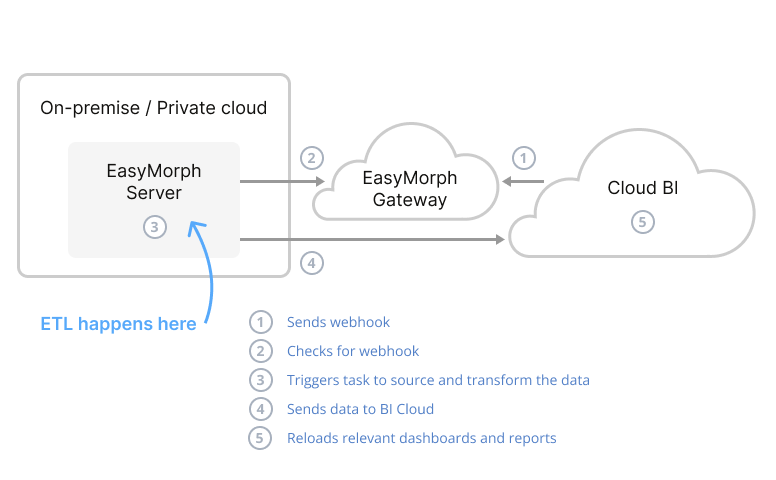
Additionally, all communications between your EasyMorph Server and EasyMorph Gateway are outbound from your Server. This means even if EasyMorph Gateway was compromised, triggering existing reload tasks is all that the malicious actors could do.
Consideration 2 - Sensitive data
All organisations have data which we consider sensitive, such as financial information or data about individuals which we are legally obliged to protect (e.g. GDPR across Europe). And of course, if we work in certain industries or types of organisations (healthcare for example), almost all of our data might fall into this category.
For sensitive data, the security considerations mentioned above are likely magnified, but there are other concerns also. If we are performing our transformation and aggregation in the BI vendor’s cloud, whether we are pulling or pushing the data, we are transmitting the raw, granular, anonymized, data to their cloud first. Again, we are relying on the security of the BI vendor. Hopefully they adhere to best practices and monitoring of security, but unless your organization is spending vast sums with them, they’re unlikely to let you audit such things. We must simply hope for the best?
And even if we aren’t planning to ever pull anonymized data into the BI cloud, there is an old saying in software development, “if it is possible for a user to do something, however unlikely it might seem, at some point someone will”.
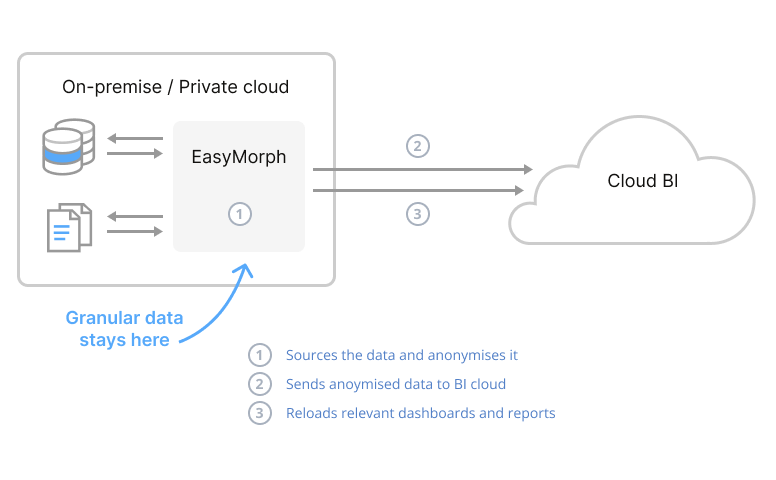
If we use EasyMorph to do our ETL where our data sits, we are free to aggregate and anonymise the data however we see fit, before it ever leaves the comfort of our own IT network. We only transmit the resulting data to our BI vendor’s cloud which minimizes the risk of fallout should the vendor suffer a security breach. Rather than trying to police every user of our BI platform, instead we must only police the small number of data engineers who are working with EasyMorph software.
Consideration 3 - Hidden costs
Most cloud BI solutions offer tiered pricing models. This can be a huge positive, allowing us to start off small, paying very little and to move up the tiering, paying more as and when we need to. Whilst this flexibility can be fantastic and offer cost savings, it can also come with some surprises.
As well as different feature sets, all tiers will come with associated capacity limits and/or “fair use” policies. These limits vary significantly by vendor and often include:
- A maximum number of apps/dashboards/etc
- A maximum number of users
- A limit on the size of an individual app/dashboard
- A limit to the data size of an individual app/dashboard - these can be the final size or the maximum size the app needs to perform a data refresh.
- The total amount of space to store data within the tenant
- A limit on the amount of data which can be moved into the tenant in a given time period.
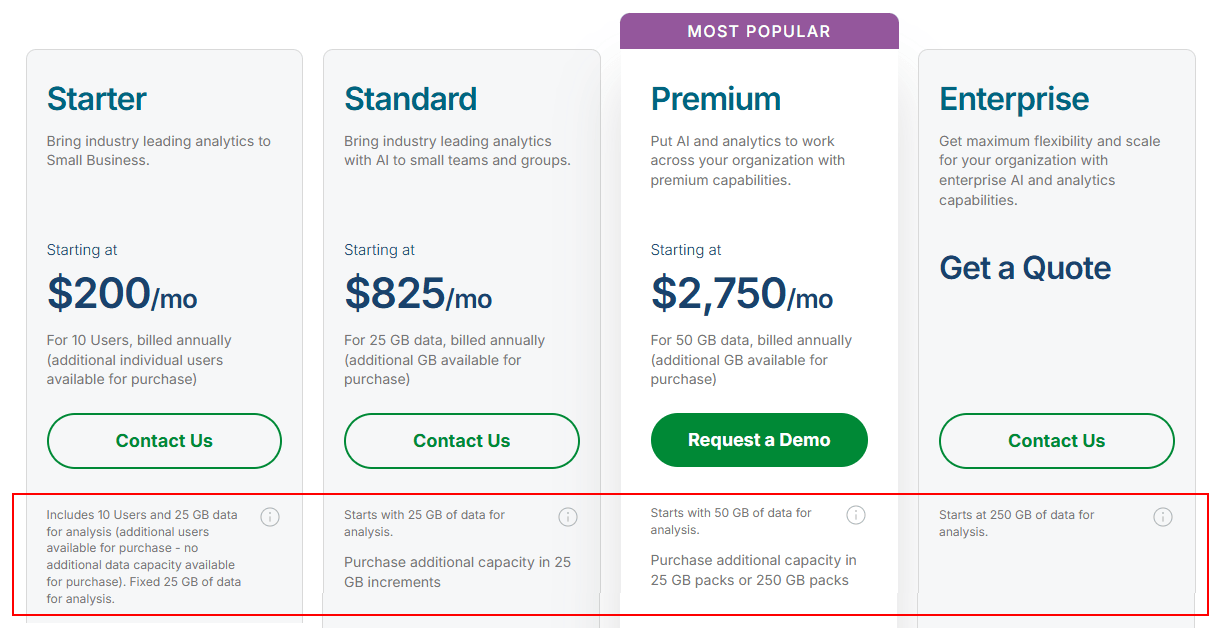
When starting out, many of these factors can be almost impossible to predict upfront, let alone if we want to accurately estimate what our cost will be in 3 years time. If we go over a limit by 1%, our bill won’t just go up by 1% but likely double or more. Exactly what happens when you reach a limit from “it stops working” to “you just get a surprise bill. Either way, assuming you aren’t going to be content with having no BI, you are ultimately left paying more than you expected. Finance Directors and CFO’s hate unpredictable costs.
To illustrate the point, below is an example of pricing for one of the leading BI tools. Note the highlighted area which shows capacity limitations for each pricing tier:
There are also other potential costs to consider which aren’t directly linked to the BI cloud itself. If your data sits within your own cloud, especially if it’s hosted on one of the big 3 providers (AWS, Azure or Google Cloud), you may want to read the small print. Cloud providers tend to make it free to import an unlimited amount of data to your private cloud, but impose limitations on the amount of data you can export without incurring what are known as “egress costs”.
Using EasyMorph to perform the ETL where our data sits offers us several opportunities to reduce the amount of traffic being moved between the source and the BI cloud, and thus, help to avoid limits and egress costs. Dashboards and reports usually need only high-level aggregated data. Aggregating the data to the required level before transmitting it to our BI cloud means much less traffic is being sent. How much less depends on many factors, but it's not unusual for it to be under 1% of the original size.
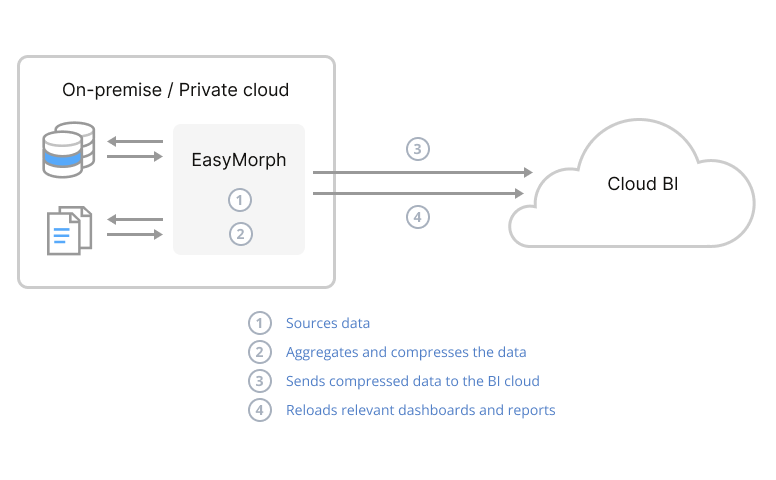
Even if we need low-level transactional data in our BI, we can still drastically reduce the traffic between the source and the BI cloud. EasyMorph can save data into all of the most common file formats supported by the major BI platforms. Many of these formats store data compressed. How much compression can be achieved depends on factors such as the cardinality of the data, but a factor of 10 is common.
Consideration 4 - Speed
In any multi-step process such as ETL, there is always one step which is the “bottleneck”, taking up a disproportionate amount of time. Many factors can be at play; such as the complexity of the data transformations, the volume of data involved and the bandwidth of our internet connections. Ultimately, when our data and BI tools sit in different locations, the most likely bottleneck is going to be in getting the data from one to the other across the internet.
If I intend to perform one reload of the data overnight each day, then I might not care how long it takes, as long as it is completed by the following morning. However, if I need the data to refresh every half an hour, but it's taking longer than that each time it runs, I have a big problem.
As explained above, using EasyMorph to perform the ETL where the data sits, we are able to drastically reduce the amount of traffic through aggregation and/or compression. As the bottleneck has a disproportionate effect on slowing down the ETL process, reducing the traffic being pushed through the bottleneck will have a huge impact on the time it takes to perform each data refresh.
Examples
Hopefully you can see some of the potential benefits of performing ETL where your data sits rather than in your BI cloud. Let’s take a look at a couple of examples specific to individual BI cloud platforms - considering the above issues and how we can overcome them with the help of EasyMorph:
Example 1 - Qlik Cloud
Since its launch in 2014, Qlik Cloud has evolved beyond traditional BI and reporting to include advanced data integrating, machine learning and predictive analytics capabilities. For the last few years they’ve concentrated their efforts on their cloud platform with their on-premises Qlik Sense offering receiving new features long after they were released to Qlik Cloud, if at all.
A big selling point of Qlik is that its highly efficient in-memory engine allows it to perform complex calculations on large volumes of low-level granular data, without the need to pre-aggregate it. Whilst this does offer lots of benefits, it means it is much more the norm to add vast quantities of data to a Qlik Cloud analytics app.
Security
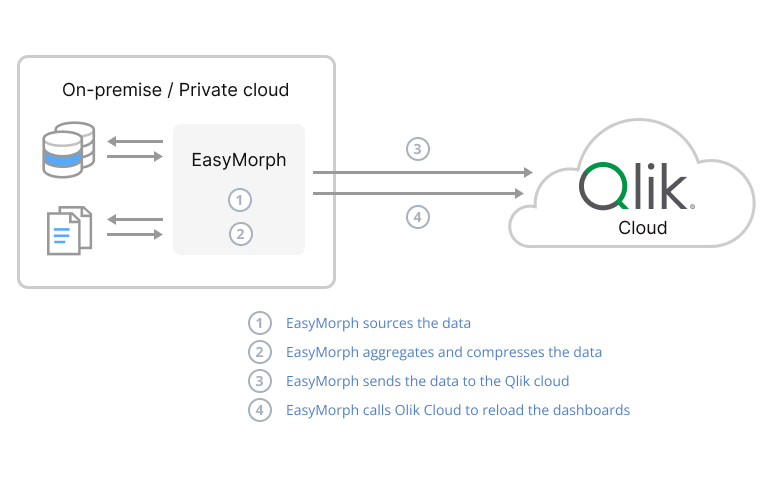
Qlik offers the “Qlik Data Gateway” software to allow their cloud to access your data sources and thus comes with many of the security considerations discussed above. It is also complex to set up and install with lots of command line work required. In contrast, EasyMorph couldn’t be simpler to install and configure.
Sensitive data
Although it is normal to add granular transactional data to Qlik applications, EasyMorph can still be used to aggregate and/or anonymise data prior to sending it to Qlik Cloud, maintaining data security. It is then impossible for any user or a malicious party to pull sensitive data into Qlik Cloud.
Hidden costs
Because it is the norm to add large amounts of data to a Qlik app, Qlik is more conscious of the potential for users to import lots of data to their cloud. Ultimately, Qlik Cloud is being hosted on Amazon AWS and so they themselves can be left with big bills due to what their customers do. As a result, the licensing tiers for Qlik Cloud have limits on the volume of data which can be imported as well as the size of each app. Tip over the tier limit and you either have to buy additional gigabytes of space or move up to the next tier, both of which represent a significant increase in cost.
Speed
Pulling lots of granular data into Qlik Cloud can of course be slow. You might assume that there is no way to mitigate this without aggregating the data and losing some of the power to drill down to transactional data. EasyMorph still has some tricks up its sleeve.
Qlik has a proprietary data file format known as the QVD. This format is compressed, and so the same amount of data stored in a QVD file can often be a fraction of the size it was in the source system. EasyMorph can read and write QVD files, as well as upload them directly to Qlik Cloud.
To demonstrate this, I performed two tests using a typical business dataset of 10 million records stored in an on-premise database, as follows:
- Using the Qlik Data Gateway giving Qlik Cloud access to the database and performing the ETL in the Qlik Cloud.
- Using EasyMorph on-premise to perform the ETL, saving QVDs and uploading them to Qlik Cloud before finally triggering the reload of the analytics app.
The results from the tests showed significant reductions in traffic volume and increases in speed:
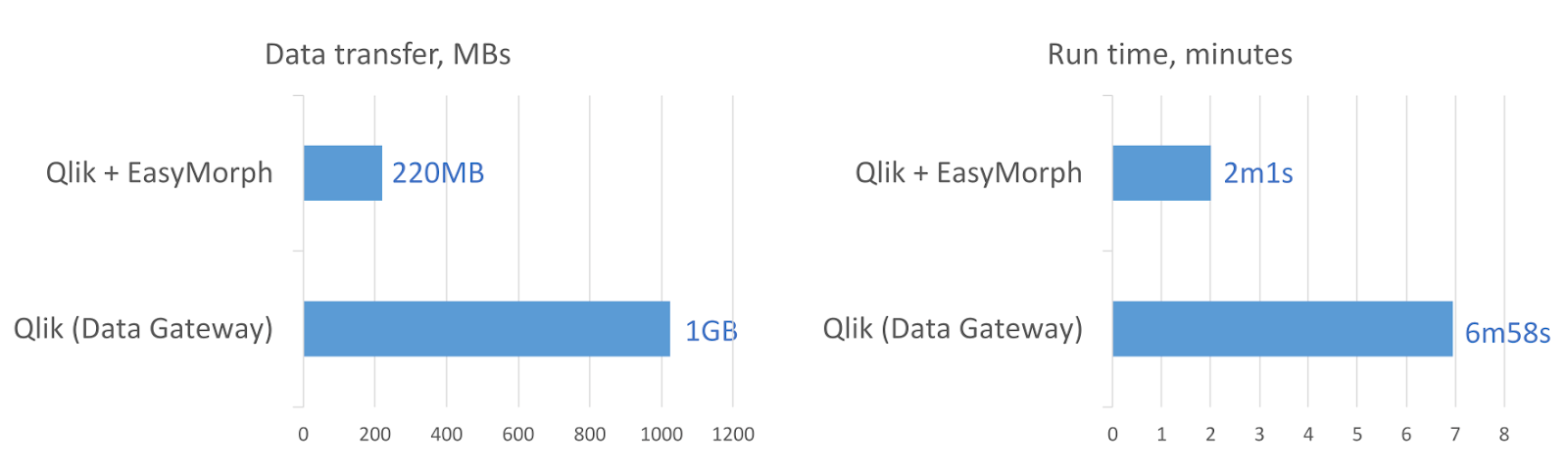
EasyMorph can also trigger reloads of Qlik Cloud analytics applications, so the data in them can be refreshed as soon as the QVD files have finished uploading.
NOTE If you’d rather still manage orchestration in Qlik Cloud, you can trigger EasyMorph workflows to run using a REST connector.
Example 2 - Tableau Online
Although Tableau Cloud is a more traditional business intelligence and data visualization platform reliant on 3rd party tools to perform complex data manipulation and aggregation, in recent years they have ventured into data preparation with the introduction of Tableau Prep in 2018. However, more recently, Tableau Prep has received limited updates and their focus appears to be on Tableau Next and tight integration with AI.
Security
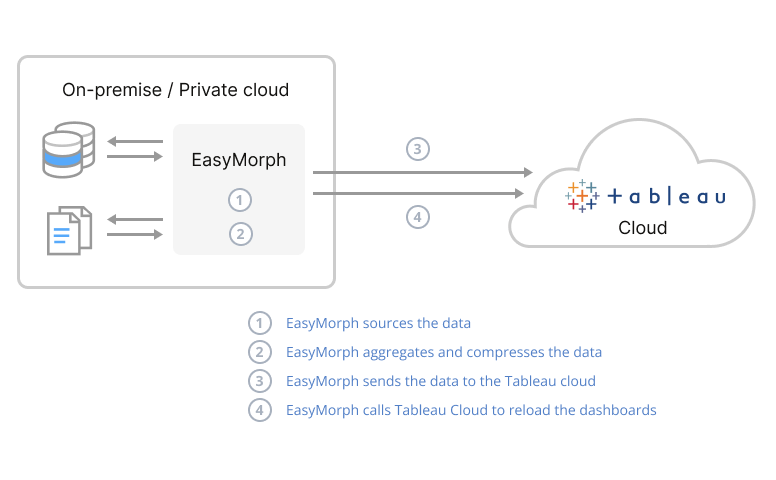
Tableau Cloud offers the Tableau Bridge software to act as a gateway for it to access your data. Although it is a little simpler to get up and running than the Qlik Data Gateway, it presents the same security considerations mentioned above. Again, EasyMorph is simple to install and configure and offers all of the security benefits already mentioned.
Sensitive data
For sensitive data, the situation with Tableau is pretty much as for Qlik. Whilst it might be more likely that we’ll be asking for already aggregated and anonymized data in Tableau, with the bridge approach, there is nothing to stop a Tableau user from pulling granular, un-anonymized data to Tableau’s cloud. With EasyMorph pushing the data, we can be sure that the data has been anonymized before it leaves our network or private cloud. The sensitive data is never exposed to Tableau Cloud in any way.
Hidden costs
Because Tableau is more of a traditional BI tool where we expect to pre-aggregate large volumes of data before trying to visualize it, they seem to be a lot less concerned about what users might do. Subsequently the capacity allowances for Tableau Cloud sites are a lot more generous. This means we don’t need to be as concerned about getting a surprise bill from Tableau (although I’d still recommend reading the allowances).
If our data is located in a private cloud, especially if hosted on one of the big 3 providers, we still need to consider if we could be stung for data egress costs. Of course, EasyMorph can help us to avoid this. If we install EasyMorph in our private cloud along with our data, anything EasyMorph can do to reduce the size of the data can help to avoid such costs. Just like with Qlik QVD files, EasyMorph can write Tableau HYPER files which are compressed.
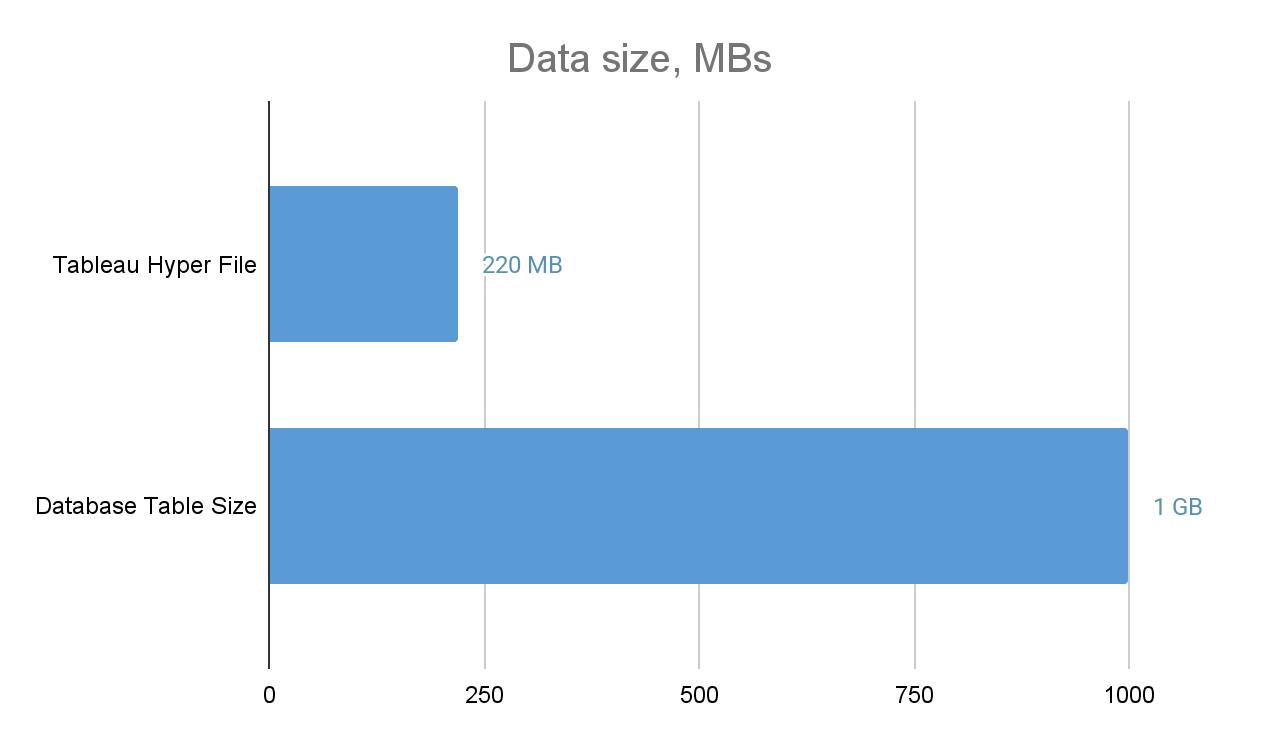
NOTE Tableau have deprecated the use of the older TDE file format due to the significantly improved performance of Hyper file. However, the same data would be even smaller in TDE file format; only 135 MB
Speed
Again, as data volumes are likely to be less, the potential for big speed improvements might be less likely. That said, as can be seen above, if the bottle neck in the process is getting the data across the internet to the BI vendor’s cloud, anything we can do to reduce data volumes can still offer some benefit. There are those cases where shaving off a few minutes can make all the difference, in which case, using EasyMorph to extract and transform the data where it is located can still be the key to success.
NOTE If you’d rather still manage orchestration in Tableau Cloud, you can trigger EasyMorph workflows to run using Tableau Webhooks.
Summary
Using EasyMorph’s powerful data preparation and automation capabilities to perform your ETL where your data is located - either in your own Cloud or on-premise IT network - provides lots of potential benefits, including performance, data security and cost savings.
To discuss your specific use case and how EasyMorph might be able to help, book a call with one of our experts today!