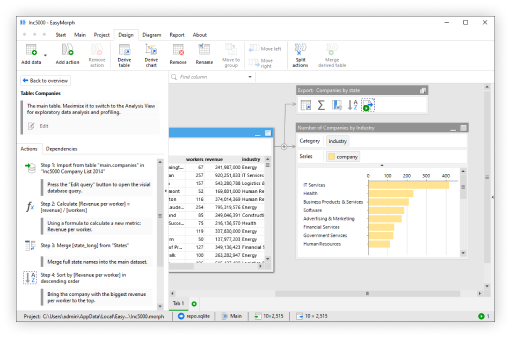
The ability to create custom actions has been one of the top requested EasyMorph features for some time. In version 6 of EasyMorph, we introduced the ability to use EasyMorph Hub Catalog assets as custom actions in a workflow. This allows us to create a custom action and then to use it in any other workflow in the same way as any of the built-in actions.
Because these custom actions are EasyMorph workflows, we have all of the available capabilities at our disposal to create them, including the ability to integrate AI and the tight integration with Python.
Tip: You’ll need to have version 6.0.1 or above of both EasyMorph Hub and EasyMorph Desktop to use custom actions. You’ll also need to link EasyMorph Desktop to EasyMorph Hub.
The key benefits of creating and using custom actions
As we’ll see in the below examples, the possible use cases for custom actions are broad, and thus, so are the potential benefits. We can, however, group them into two main categories.
The first category I’ll call “Empowerment”. Complex logic and highly technical capabilities can be created and/or wrapped in an EasyMorph workflow and made available to users of all technical abilities. This offers benefits including:
- Simplify complex data processing for less data literate colleagues.
- Solve complex technical problems such as connecting to exotic or non-standard business systems; making them accessible to all.
- Make it simpler for end users to leverage Python or AI tools to process or make sense of data.
- Allow true “Self Service” data retrieval for people across all business areas and technical abilities.
Empowering business users to access the data they need, when they need it without having to wait for IT or data teams to source data for them or process it in a detailed and complex way means more productivity. And in turn, less load on the technical teams frees them up for more productive, “value add” tasks in turn.
The second set of benefits I call “Standardization”. Most businesses are full with a minefield of separate reports, BI dashboards and data files, many of which apply the same business logic or at least they are supposed to. All too often they turn out to have nuanced differences. Using custom actions we can:
- Standardize business logic into reusable actions to be used across all data processing,providing “one version of the truth”.
- Change business logic when needed in a single place and it will be automatically inherited by all workflows using it.
- Check and validate if data meets required or expected formats.
- Find and even resolve common or business specific data quality issues.
Gartner estimates poor data quality costs organizations an average of $12.9 million every year in wasted resources and lost opportunities. Using custom actions to standardize business logic and improving data quality means less mistakes, more reliable reports, better business decisions and less potential cost.
How custom actions work
There are 4 types of EasyMorph Hub Catalog assets which can be used as custom actions, each with slightly different requirements for what they expect to be passed and whether or not they pass back data.
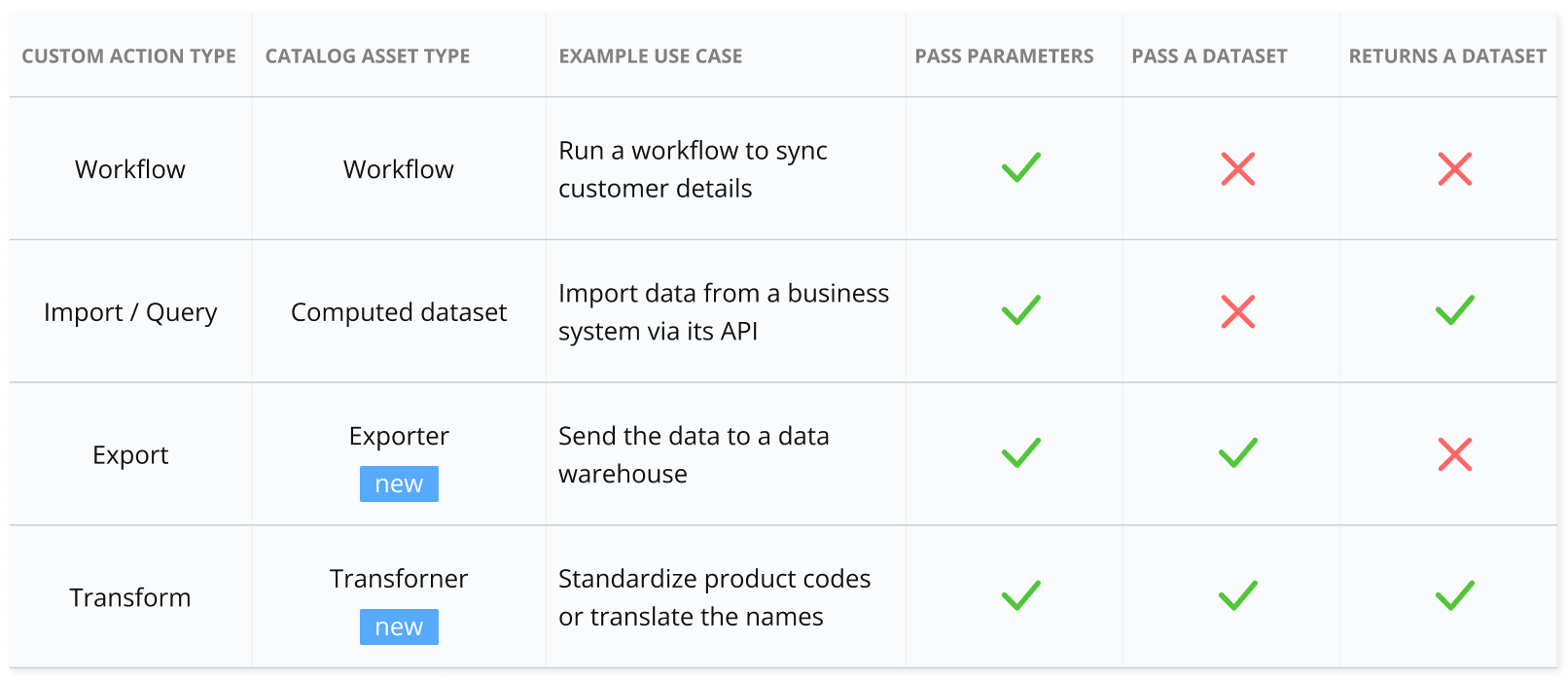
Once you publish a workflow to the Hub Catalog as one of the above asset types, and you have EasyMorph Desktop connected to the Hub, it can be added as a custom action when creating a workflow.
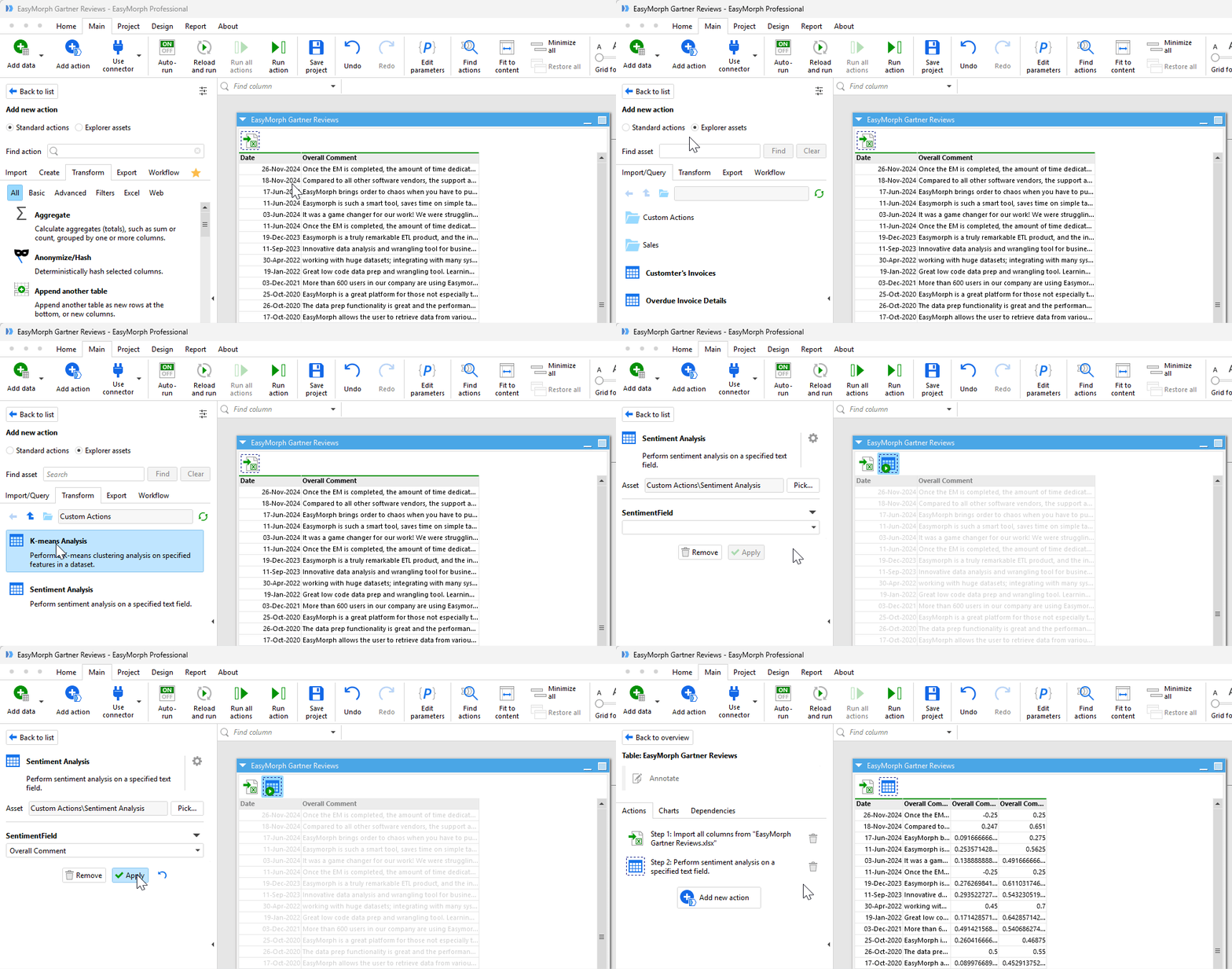
Clicking on the “Add action” button opens the action list as always. At the top of the list is an option to switch between EasyMorph’s inbuilt “standard actions” or “Explorer assets”.
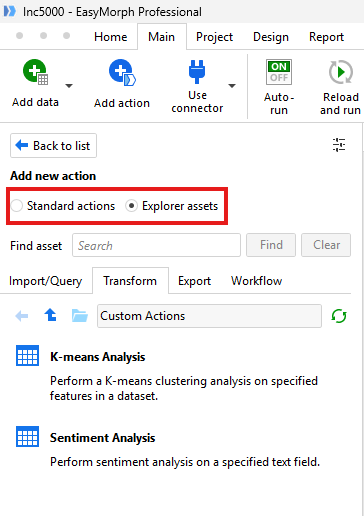
Selecting the latter shows all of the Explorer catalog assets which can be used as custom actions, broken down into the 4 types mentioned above.
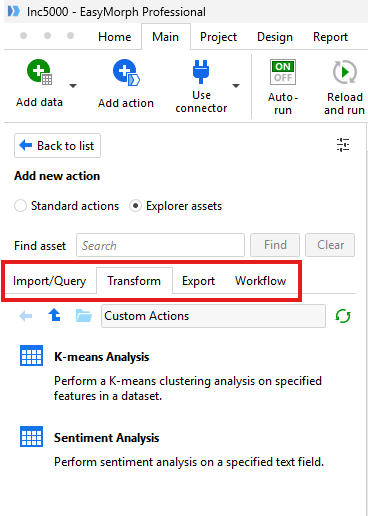
You can simply drag these custom actions into your workflow just like any inbuilt action. The settings bar will show all of the parameters within the custom action workflow as if they are settings of the action. To the end user, there is virtually no difference between using an inbuilt action or a custom action.
One important thing to note is that custom actions are executed on the server which EasyMorph Hub is installed on, even when included in a workflow being run on an end user’s PC. This offers some extra benefits, such as being able to utilise the power and performance of the server. Also, if the custom action uses Python, the end user doesn’t need to have Python installed on their machine as well as all of the libraries and additional tools which may be needed, offering greater control and less work and security risks for IT.
Let’s look at my 3 favorite cases for custom actions and why you should be using them now.
1. Wrapping Python scripts for business users
Performing complex statistical analysis, machine learning or data science is normally out of reach of the average business user, requiring writing and running Python (or similar) code. Instead, they have to rely on the data engineering or data science teams to provide them with the analysis they need. Not only does this delay the business users getting updated data, it puts a constant strain on the data team having to rerun the same logic each week or month.
EasyMorph’s tight integration with Python allows it to not only run a Python script from a workflow but to seamlessly pass parameters and data between the two. This means an EasyMorph workflow can source data, transform it, pass it to a Python script to perform some form of complex analysis, and then receive back the resulting data before presenting it to the user or feeding it into a report or business intelligence system.
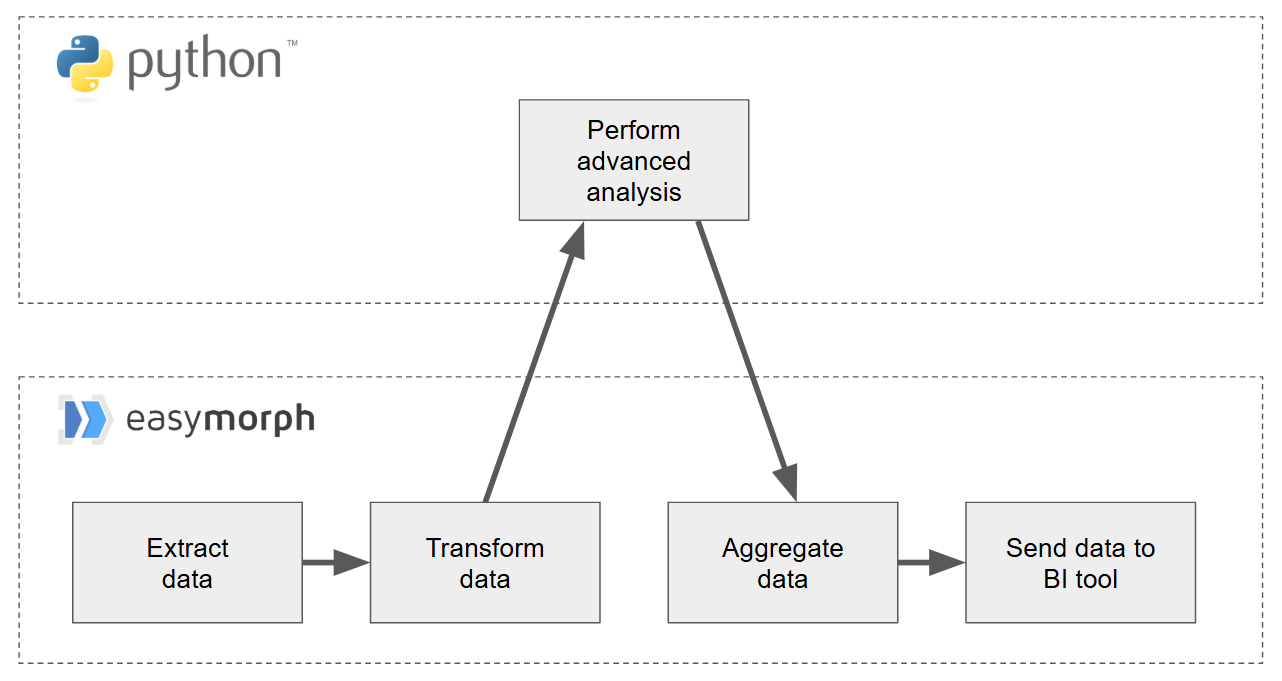
Wrapping Python scripts in an EasyMorph workflow and making it available in this way, means business users don’t need to worry about having Python set up on their computers or making sure all the relevant libraries are installed. In fact, they don’t even need to know that a Python script was involved. All of this is handled on the server which EasyMorph Hub is installed on.
Let’s take a look at one such custom action, a workflow which runs a Python script to perform a K-means clustering analysis. If you aren’t familiar with clustering an]orry, it is simply a way to group data based upon specified criteria (known as features). In this example, we’re grouping customers based upon their age, income and the amount they’ve spent with us. Our marketing team can then use these groupings to better advertise suitable products to them.
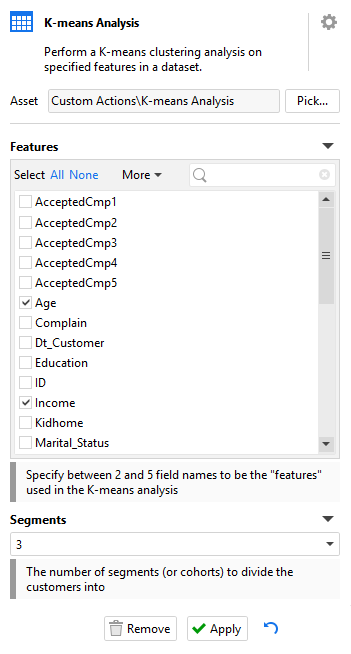
When added to our workflow, the custom action has the following settings which the user can use to define which fields in the data should be used to perform the analysis and how many groups (A.K.A segments or cohorts) the customers should be divided into.
The action runs, performs the analysis and the data is returned to the user.
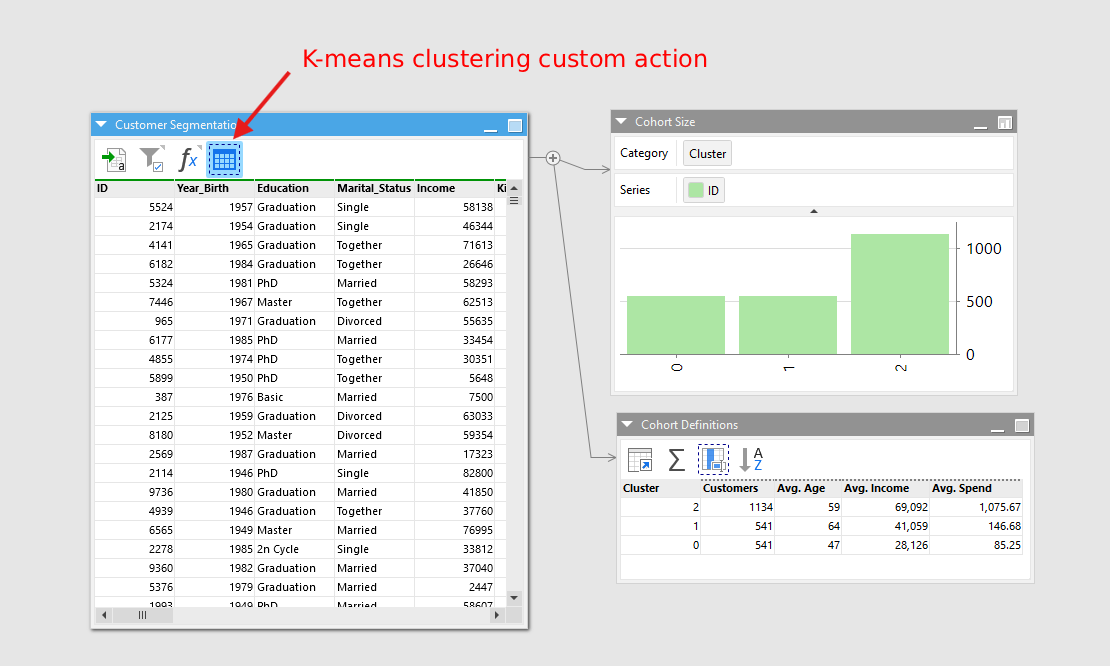
Without touching any code or even knowing Python was involved, end users can perform a complex data analysis as part of their workflows in a way that is simple to understand and implement.
Download the K-means Python script and custom action workflow
Tip: This example requires knowledge of Python to set it up on your EasyMorph Hub as a custom action. It will NOT just work out of the box.
The possibilities for wrapping Python scripts as custom actions are almost endless. Just a few examples include:
- Performing sentiment analysis on customer feedback or social media posts.
- Import data from or send data to problematic legacy systems that can be difficult to work with without writing custom code.
- Convert less common file formats such as converting Excel XLSB files to normal XLSX files.
- Perform advanced machine learning or predictive modelling on data to gain new business insights.
- Make it simple for people to use AI in their data processing workflows without having to worry about connecting to it or crafting prompts that work.
- And many more…
2. Controlled data extraction
Every business has those “power users”. The tech-savvy, data literate Excel experts who aren’t a data analyst or data engineer, but who can do much more with data than your average business user.
Allowing these users to run SQL queries against the databases of your critical business systems can have a lot of benefits but also comes with a lot of risk. Giving them such access enables them to find valuable business insights. But it also risks them running a complex SQL query against the database and drastically affecting its performance or even taking it down altogether.
In an ideal world we’d have a constantly synchronized copy of the databases especially for reporting. But this can be costly and difficult to set up, and so most businesses I’ve worked with over the last 25 years still run SQL reporting queries from the production database.
Wouldn’t it be great if we had a way to give these power users the ability to access the data they need in a way which prevents them from writing and executing SQL queries directly against the database, but still allows some control and flexibility over which data they need. Well with custom actions we can do just that.
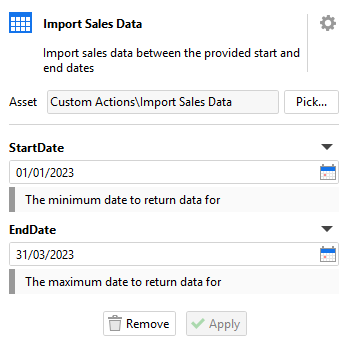
I can create a workflow to extract data from my “sales_transactions” database table. I can add parameters for a “StartDate” and a “EndDate” as well as for them to select specific “stores”. The workflow can then use these parameters to build the relevant SQL query to extract the data from the database and to return it to the user.
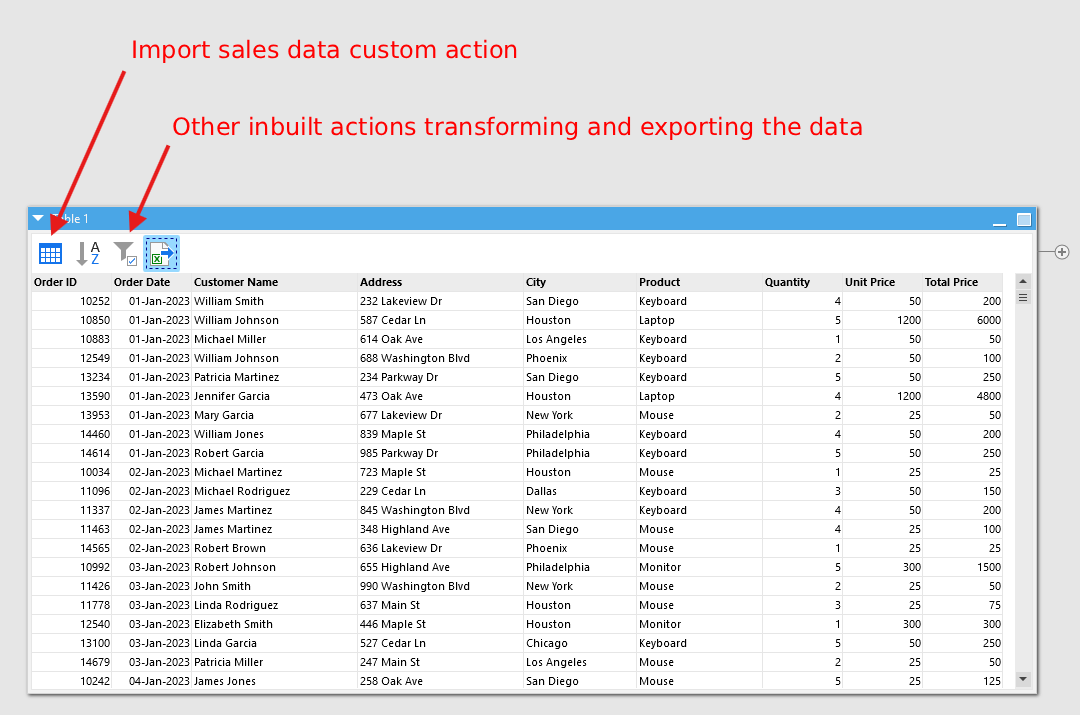
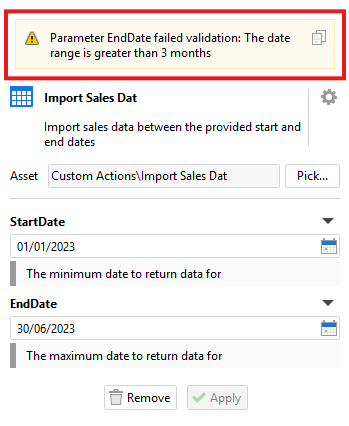
In the custom action workflow, I can create whatever checks and restrictions are necessary to protect the database. For example, my workflow can check that the date range specified isn’t too large (e.g. they can only return 3 months data maximum in one go). I could even add a check for the current time, so that if they try to request data within critical business hours, they instead receive an error message or a cached version extracted earlier.
Download the controlled data extraction example
3. Data validation
Messy data and data quality problems are the enemy of all businesses. These problems can take many forms, such as:
- Erroneous order dates which are before our company even existed or are far in the future.
- Generic messy data such as email addresses which aren’t a valid format or postal codes not complete.
- Inconsistent company data formats such as product codes appearing in different formats in different systems.
These problems don’t just make reports look messy, they can result in reports being completely wrong. It is possible to create custom to not only find but to also resolve these kinds of data issues.
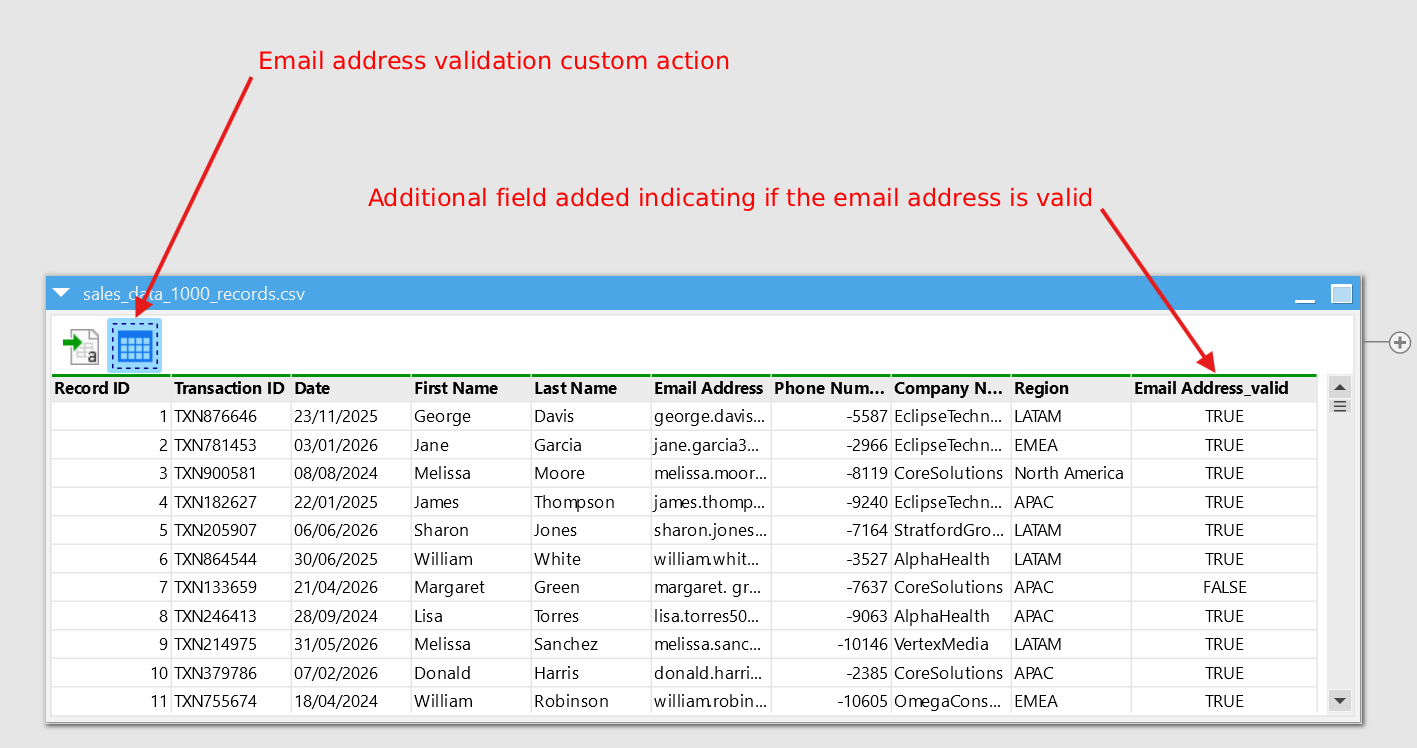
For example, I’ve created a custom action to validate email addresses are a valid format. In the action’s I can configure which field contains the email address in the settings, and whether the action should remove invalid records or add an additional column flagging them.
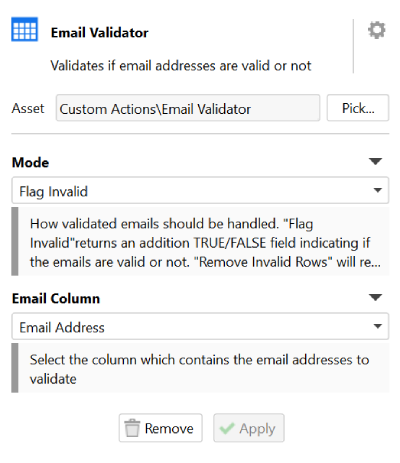
This custom action can then be used in as many workflows as needed, by as many people in our company as can use EasyMorph.
Download the email validation example
Similar validation check custom actions could be created to:
- Format product codes coming from different sources, ensuring they are always uppercase and numeric characters and padding them all to the correct length.
- Check address information is complete and is not missing postal/zip codes.
- Ensure long text fields aren't too long to be imported into a BI tool or business system, automatically trimming them to the right length.
- Check and remove specific character from text which could be problematic if imported into a database or system, such as removing any HTML tags that could break a wesite displaying the data.
- Use the EasyMorph Data Quality Toolkit as a custom action, defining a simple data contract and testing a dataset against it.
Conclusion
These are just a few simple examples of what custom actions in EasyMorph can be used for and there are almost endless possibilities.
If you’d like to discuss how custom actions could help to standardize your data preparation and empower business users, book a call with one of our team today!